

Welcome to the second edition of my series on Business Central Document Dates where I will be focusing on all things dates relating to the Sales Order document. This is a follow up to my edition on Purchase Order dates which can be found here.
Clients often ask me what the various document date fields across transactional documents mean and how they interact with other dates. Or I come across some very creative uses of existing date fields. Whilst it might be tempting to adopt the use of one of the “other” date fields you may not currently be utilising, I can assure you they all serve a unique purpose.
Over the coming months I will be releasing a series of articles around the Dynamics 365 Business Central Document Dates, which started with Purchase Orders. I hope to dispel some of the ambiguity of the date fields across all documents. In the next installment we’ll take a look at Transfer Order dates.
Sales Order Dates
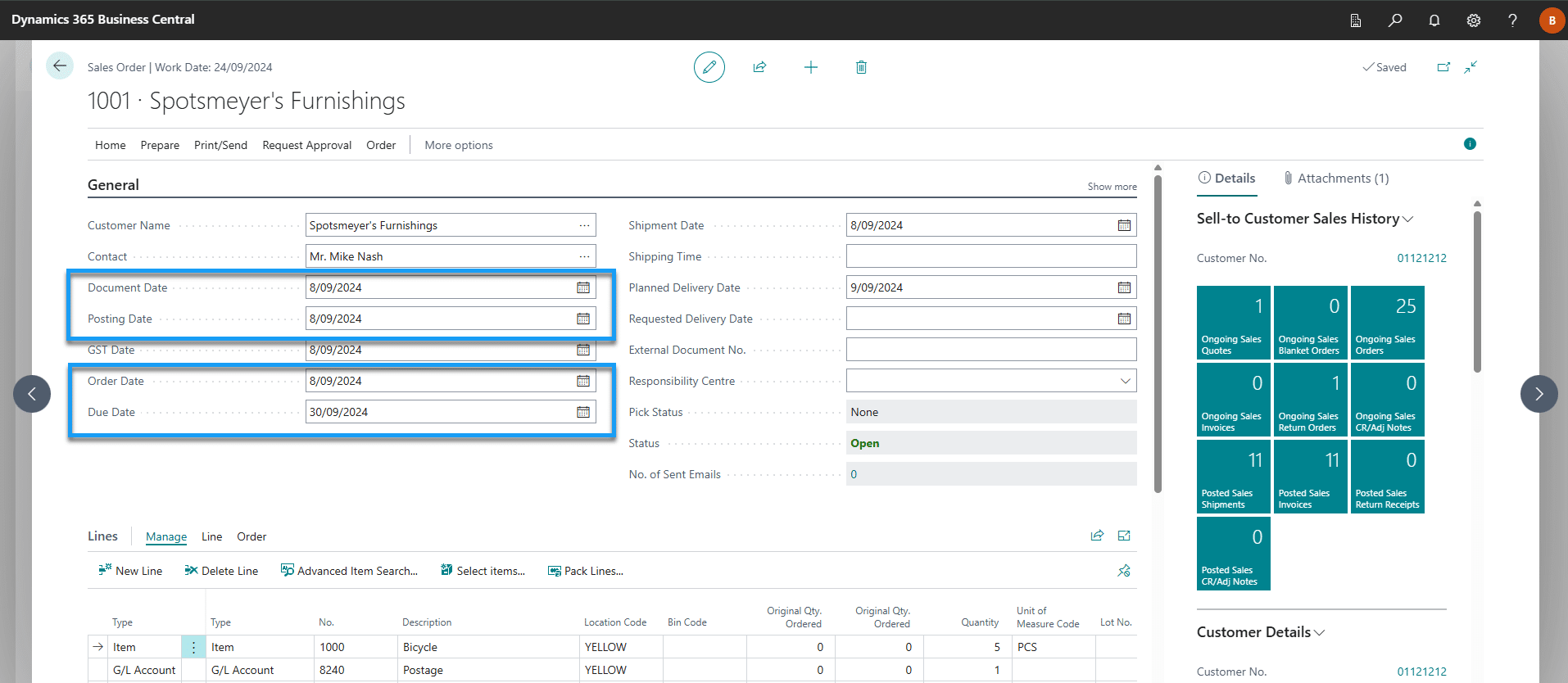
Posting Date
Specifies the date that will be attributed to ledger entries when order postings occur.
Order Date
Specifies the date the order is created and is the basis for pricing calculations.
Document Date
Specifies the customer invoice date or the start date of payment terms.
Due Date
Specifies the due date of the customer invoice.
Document Date + Due Date calculation = Due Date
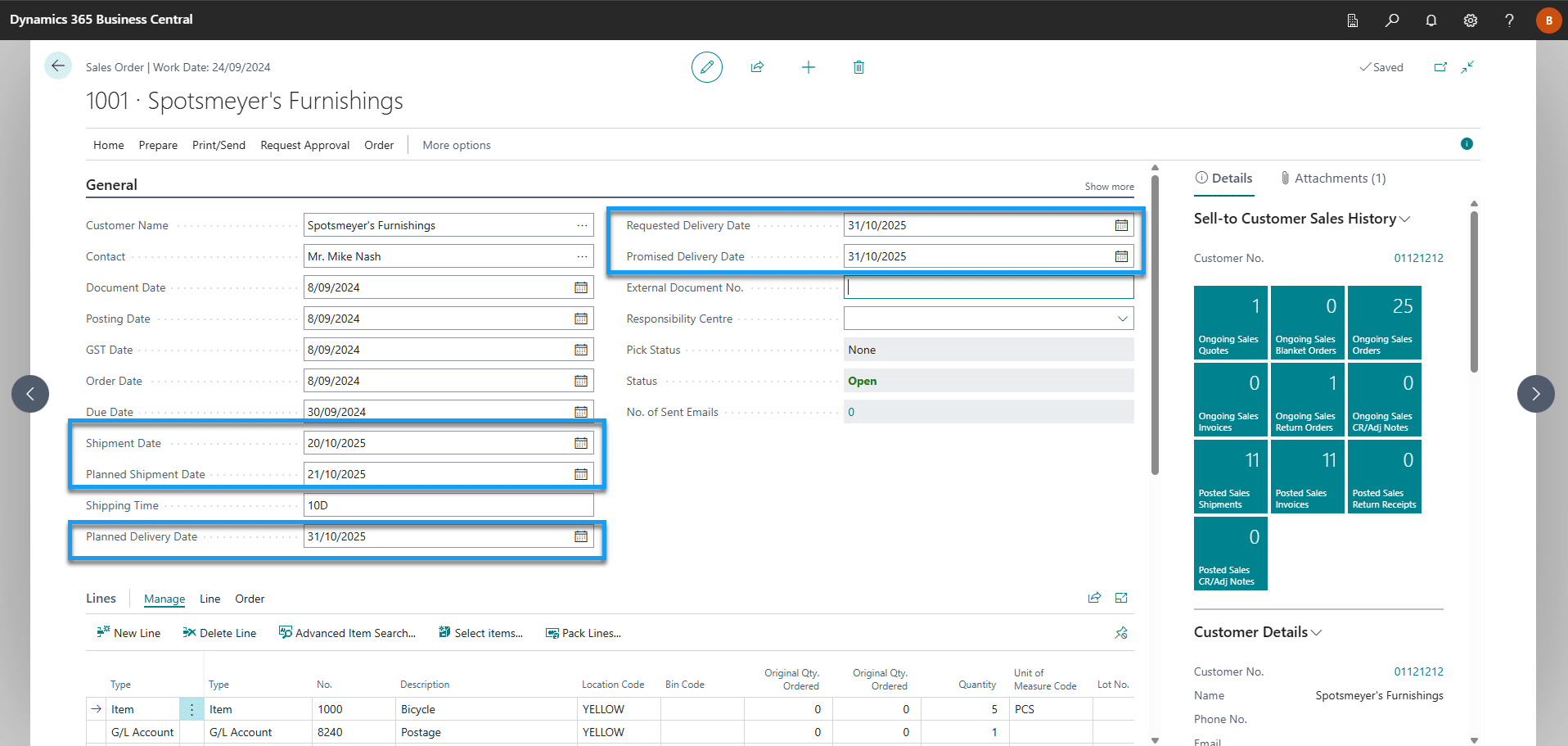
Requested Delivery Date
Specifies the date the customer has requested for you to deliver the order.
This is an optional date field. Setting a requested delivery date will calculate backwards to set the date you should ship the order.
Requested Delivery Date – Shipping Time = Planned Shipment Date
Promised Delivery Date
Specifies the date you have promised the customer you will delivery the order.
The date you have promised the customer to deliver the order. By default, it is blank. When you update the date, the system will update Planned Delivery Date = Promised Delivery Date, and will lock Requested Delivery Date.
Shipment Date
Specifies the date that the item is expected to be unavailable in inventory (not necessarily deducted from inventory depending on outbound warehouse setup).
This field is used by Business Central to calculate the availability of an item.
Planned Shipment Date
Specifies the date you expect the item to be deducted from inventory.
This field differs from Shipment Date in that it may take the warehouse time to pack and ship orders before inventory is deducted from the ledger, but the item is considered unavailable as of the shipment date (start of the outbound warehouse process).
Planned Shipment Date - Outbound Whse. Handling Time = Shipment Date
Planned Delivery Date
Specifies the date you plan to deliver the goods to the customer.
This date differs from the Requested Delivery Date and Promised Delivery Date in that it is calculated based on your internal expectations of fulfillment times rather than just the customers expectations (this date should be closer to reality providing setup is accurate).
Planned Shipment Date + Shipping Time = Planned Delivery Date
FAQs
What’s the difference between “Order Date”, “Document Date” and “Posting Date” on a Sales Order?
- Order Date = when the sales order is created; basis for pricing.
- Document Date = the date that becomes the invoice date / triggers payment-terms (i.e. when payment terms start).
- Posting Date = the date the transaction is recorded in the ledger (i.e. when the sale is posted).
If I change the Posting Date later (e.g. posting in a later month), does it affect the Document Date or Due Date?
- By default, Document Date and Posting Date are independent, changing the Posting Date doesn’t automatically update Document Date.
- Because Due Date is calculated from Document Date and payment terms, changing Posting Date alone will not shift the Due Date.
- If you want the Document Date to always match Posting Date, you can enable the “Link Doc. Date to Posting Date” toggle in Sales & Receivables Setup.
What are the practical uses of the “Requested Delivery Date” vs “Promised Delivery Date” vs “Planned Delivery/Shipment Date”?
- Requested Delivery Date is when the customer wants to receive the order. If set, BC will back-calculate the date you need to ship to meet that.
- Promised Delivery Date is when you (the seller) commit to deliver. Setting this locks the Requested Delivery Date (so you don’t accidentally miss your commitment).
- Planned Shipment / Delivery Date is an internally calculated date (based on your warehouse/shipping lead times) that represents when you realistically expect to ship/deliver. Useful for operational planning rather than customer promises.
When does the “Shipment Date” matter and what does it affect?
- Shipment Date marks when items are expected to be unavailable in inventory (i.e. items are committed to the order).
- Depending on your warehouse setup, inventory may not be physically deducted until after handling time, but from the point of view of availability, Shipment Date is what matters.
Why might we want different values between Document Date and Posting Date — is there a legitimate business scenario for that?
- Some businesses need the invoice/payment terms to start on the date the invoice is issued (Document Date), but post the transaction (for ledger or financial reporting) on a different date (Posting Date), especially if there are accounting-period or month-end considerations.
- This flexibility allows for compliance with accounting standards (actual posting date) while maintaining correct payment terms and customer billing cycles.
If I update a date on the Sales Order header (e.g. change Requested Delivery Date), do those changes generate automatically to the order lines?
- Yes, if you change header-level date (like Requested or Promised Delivery Date), BC will ask whether you want to update the dates on each line. Accepting will generate the changes.
- If you skip propagation, line-level shipping dates remain separate, meaning header vs line dates can diverge (useful if different lines have different fulfilment schedules).
What date does the system use to calculate the invoice’s Due Date? Document Date or Posting Date?
- The system uses Document Date and payment terms to compute the invoice Due Date.
- If Document Date is different from Posting Date, then Due Date may not align with when the transaction is posted, which can matter for cash-flow and reporting.
Are there any fields that are optional, and what happens if they are left blank?
- The Requested Delivery Date is optional. If not set, then shipping planning may default to internal lead-times or be determined later.
- If Promised Delivery Date is left blank, Planned Shipment/Delivery Dates depend on internal warehouse time assumptions rather than a firm customer commitment.