
Run multiple legal entities in one Business Central company, without duplicating setup
In Business Central, every new legal Entity means creating a new company. Each with its own Chart of Accounts, Customers, Vendors, and processes. Business Central’s standard intercompany functionality helps connect these silos, but at a steep operational cost. Users are constantly switching between companies, managing intercompany transactions across databases, and rolling everything up to a separate consolidation company just to see the big picture.
The result? Data duplication, sluggish intercompany workflows, manual reconciliations, and reporting that feels like piecing together a puzzle from scattered fragments. Finance teams spend hours chasing down errors and aligning numbers across invisible walls.
Fenwick Apps Multiple Entity Operations changes the game. Now, you can operate seamlessly within a single company. Eliminating duplication, accelerating inter-company transactions, and easily managing consolidated reporting.
How Multiple Entity Operations Works
Multiple Entity Operations (MEO) transforms the way you manage legal Entities in Business Central. Instead of coordinating separate companies, MEO lets you run unlimited Entities inside a single company. Each with its own financial identity, but all sharing the same master data and operational platform.
Entities as Dimensions
MEO uses a dedicated Entity Dimension as the foundation for how legal ownership is tracked in the system. Each Entity is represented as a Dimension value which is applied to every transaction, document and journal line, so filtering, reporting, and balancing are all driven from the single dimension. Ownership is explicit and transparent, so nothing is hidden or implied. This dimension-based model is the backbone of how MEO controls and reports entity ownership.

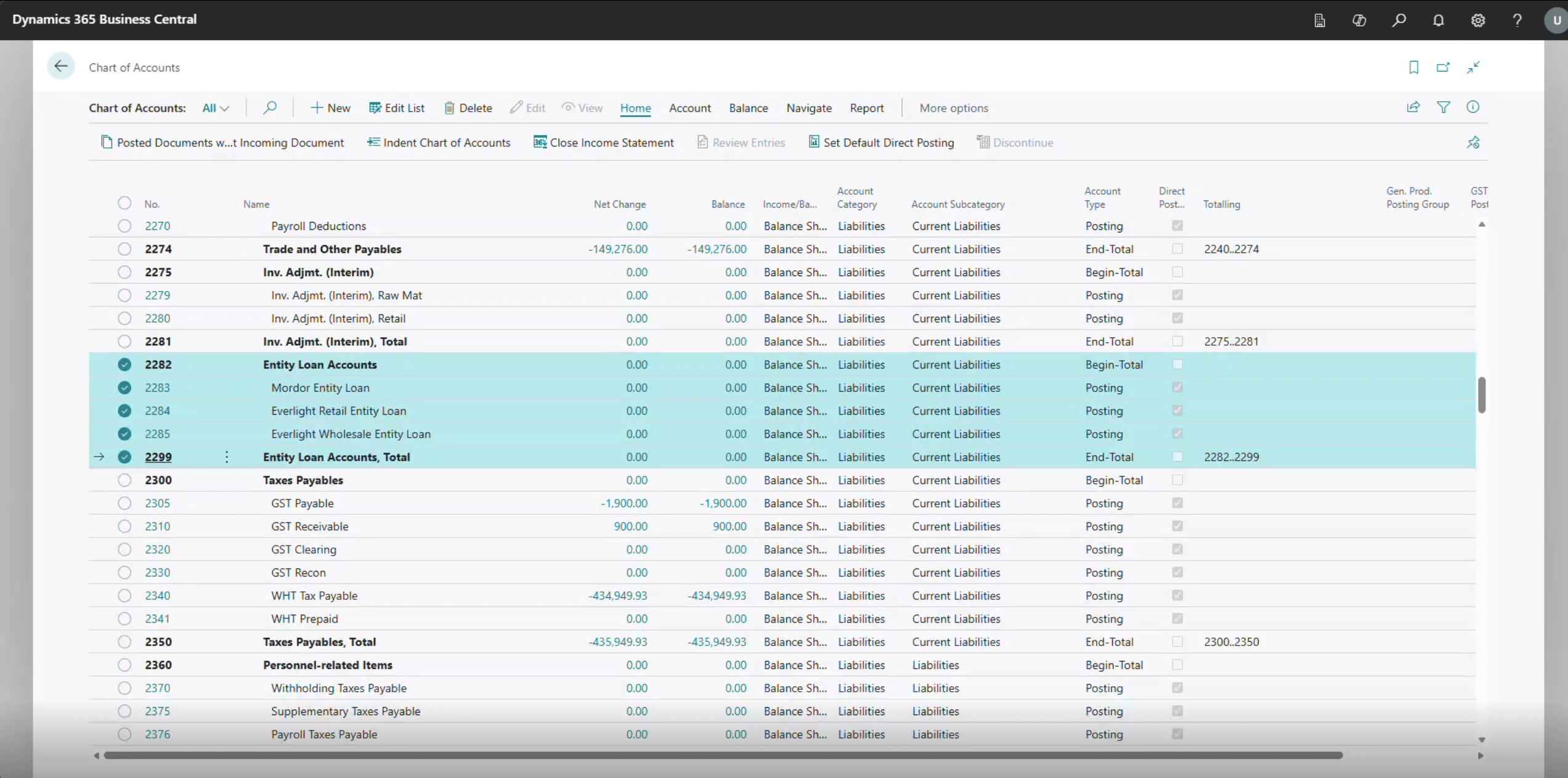
Entity Loan Accounts
Every Entity has its own loan account in the Chart of Accounts. These accounts track inter-entity balances, ensuring that money moved between entities is always visible and reconciled.
Responsibility Centres
Responsibility Centres provide the day-to-day operational context for Documents. In MEO, each Entity is represented as a Responsibility Centre. When users create Sales Orders, Purchase Orders etc, the Responsibility Centre drives Entity specific behaviour, setting defaults like Locations and Dimensions and restricting viewing of documents if users are assigned to a Responsibility Centre. The Responsibility Centre will also drive the Company Name, Address and branding of printed/emailed documents such as the Tax Invoice.

Entity Posting Automation
Inter-entity transactions are streamlined. When one Entity sells to another, MEO can automatically create the corresponding purchase document for the receiving Entity, post both sides, and update balances. No manual entry required or cross-company hassle.
Entity Mapping
MEO ensures that each side of an inter-entity transaction posts to the correct General Ledger accounts (e.g., revenue for the seller, expense for the buyer), even if the transaction types differ. This mapping keeps your Chart of Accounts clean and your reporting accurate.
Customer and Vendors
Customers and Vendors can be Assigned an Entity Responsibility Centre to facilitate Automated transactions between entities when purchasing and selling via documents.
Locations
Locations are linked to the Entity Dimension to ensure all inventory transactions are linked to the entity ownership.
Unified Reporting
Because all Entities operate within one company, you can filter, analyse, and consolidate results instantly. No more assembling data from siloed companies, just clear, entity-driven insights at your fingertips. All Inter-Entity Transactions are flagged so you can simply choose to exclude these transactions for an instant consolidated view with eliminations.
Feature Spotlight: Entity On-Charging
Managing shared costs across multiple Entities can be a headache. Especially when a single purchase benefits several parts of your business. The new Entity On-Charging feature in Multiple Entity Operations automates this process. Ensuring every Entity pays its fair share, with full auditability and correct tax treatment.
Imagine a group of clinics purchasing medical supplies in bulk. With Entity On-Charging, you enter the invoice once, allocate each line to the relevant clinic, and MEO will automatically create and post all the required inter-entity purchase and sales invoices between the clinics. This ensures costs are accurately distributed, tax entries are handled correctly, and every step is fully traceable. You gain a complete audit trail that supports compliance, while manual effort is eliminated and errors are reduced.
In short
Multiple Entity Operations (MEO) is a game changer for businesses that have multiple legal entities within Dynamics 365 Business Central. Control all Entities within one company.
- Reduce duplications
- Remove manual reconciliations
- Easily manage consolidated reporting
FAQs
- App for Microsoft Dynamics 365 Business Central
- MEO lets you run multiple legal entities in one company with shared master data and no duplication
- No separate companies required
- No manual reconciliations
- No consolidation company needed
- Automated inter-entity transactions
- Entities = Dimension values
- Applied to every transaction
- Clear ownership and visibility
- Responsibility Centres represent entities on Documents
- Auto-assign Entity Dimension and Location
- Drive entity-specific defaults
- Enable restricting user view of Documents
- Auto-creates both sides (sales/purchase)
- Auto-posts transactions
- Updates balances instantly via Loan Accounts
- Track inter-entity balances
- One per Entity in the General Ledger
- Always reconciled and visible
- Allows you to allocate shared costs across entities
- Enter an invoice once
- Auto-generate inter-entity entries with a full audit trail and tax accuracy
- Provides a real-time consolidated view
- Filter by entity instantly
- Remove Inter-Entity transactions
- No manual data aggregation
- No data duplication
- No manual reconciliations
- Faster inter-entity processing
- Instant consolidated reporting
- Full visibility across entities
- Multi-entity organisations
- Franchise groups
- Healthcare networks
- Shared service businesses
- Correct tax on all transactions
- Full audit trail
- Simplifies audits
- Yes
- Instant reporting without rollups
- Consolidation needed for differing currencies, however can consolidate by Entity