

Welcome to the third edition of my series on Business Central Document Dates where I will be focusing on all things dates relating to the Transfer Order document. This is a follow up to my edition on Sales Order dates which can be found here.
Clients often ask me what the various document date fields across transactional documents mean and how they interact with other dates. Or I come across some very creative uses of existing date fields. Whilst it might be tempting to adopt the use of one of the “other” date fields you may not currently be utilising, I can assure you they all serve a unique purpose.
Over the coming months I will be releasing a series of articles around the Dynamics 365 Business Central Document Dates, which started with Purchase Orders. I hope to dispel some of the ambiguity of the date fields across all documents. In the next installment we’ll take a look at Assembly Order dates.
Transfer Order Dates
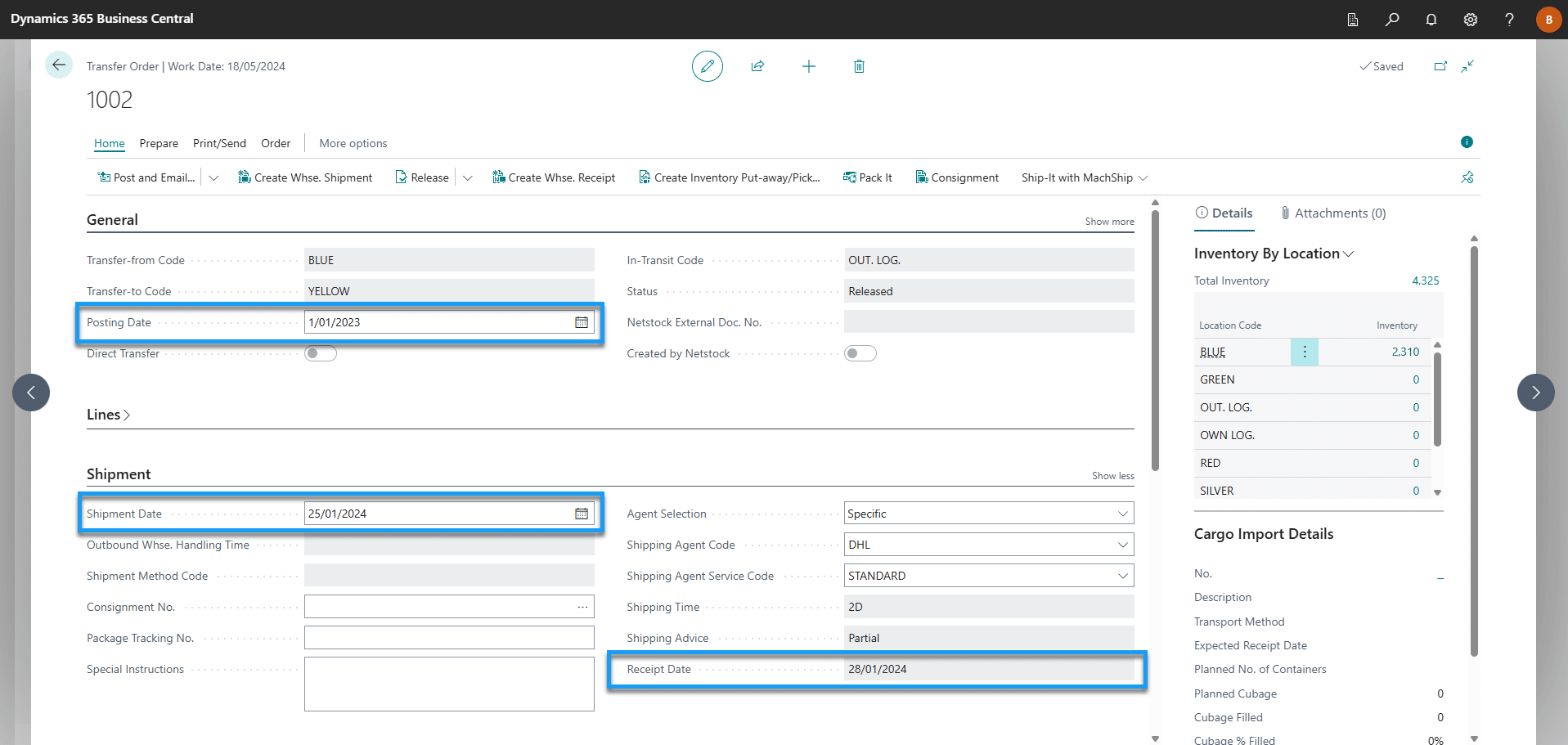
Posting Date
Specifies the date that will be attributed to ledger entries posted from the order.
Shipment Date
Specifies the date that you expect the items to be deducted from the Transfer-From location’s inventory.
Receipt Date
Specifies the date that you expect the items to be available in the Transfer-To location’s inventory.
For the below Receipt Date calculation to be accurate, the following setup fields should be maintained;
- Outbound Whse. Handling Time on the Transfer-From Location Card
- Shipping Time on the Shipping Agent Service which is then defined against the Transfer Route used between the Transfer-From and Transfer-To Locations.
- Inbound Whs. Handling Time on the Transfer-To Location Card
Note: Outbound/Inbound Whse. Handling Time is not defined at location level the equivalent fields will be used from Inventory Setup.
Shipment Date + Outbound Whse. Handling Time + Shipping Time + Inbound Whs. Handling Time = Receipt Date
FAQs
What are document dates in Transfer Orders?
Document dates in Transfer Orders within Microsoft Dynamics 365 Business Central define when different parts of the inventory movement are expected to occur.
They are used to:
- Control inventory availability and planning
- Drive warehouse activities and logistics timing
- Determine the financial posting period of the transaction
- Ensure accurate reporting and traceability of stock movements
What is the Posting Date used for?
The Posting Date determines when the transaction hits the ledger.
- Sets the date for all related inventory and value entries
- Controls which accounting period the movement is recorded in
- Impacts financial reporting and stock valuation
- Does not control physical shipment or receipt timing
What does the Shipment Date mean?
The Shipment Date represents when items are expected to leave the Transfer-From location.
- Drives warehouse picking and dispatch activities
- Indicates when inventory is reduced at the source location
- Helps planners understand when stock is no longer available
- Used for operational scheduling rather than financial posting
What is the Receipt Date used for?
The Receipt Date reflects when items are expected to arrive at the Transfer-To location.
- Determines when inventory becomes available for use or sale
- Impacts supply planning and demand fulfilment
- Helps teams coordinate inbound warehouse workload
- Is calculated based on transport and handling setup (if configured)
How is the Receipt Date calculated automatically?
For accurate automatic calculation, the system uses configured lead times, including:
- Outbound Warehouse Handling Time at the Transfer-From location
- Shipping Time defined in the Shipping Agent Service
- Inbound Warehouse Handling Time at the Transfer-To location
These values combine to model the real-world transfer timeline.
What happens if warehouse handling times are not set at the location level?
If handling times are not defined on the Location Card:
- The system falls back to the equivalent settings in Inventory Setup
- This ensures transfers can still calculate dates consistently
- However, location-level configuration is recommended for accuracy
Why shouldn’t we repurpose unused date fields?
Each date field serves a specific operational or financial purpose.
Using them incorrectly can:
- Distort planning calculations
- Cause misleading availability dates
- Impact financial period reporting
- Create confusion during audits or troubleshooting
Which date affects inventory availability the most?
The Shipment Date and Receipt Date drive availability:
- Shipment Date – reduces supply at the source location
- Receipt Date – increases supply at the destination location
- Posting Date – affects accounting, not physical availability
How do Transfer Order dates support better supply chain planning?
When configured correctly, these dates help:
- Align warehouse execution with logistics timelines
- Provide realistic lead-time visibility
- Improve replenishment and transfer planning
- Reduce manual scheduling adjustments
What is the best practice for configuring Transfer Order dates?
To get reliable and meaningful dates:
- Maintain warehouse handling times for each location
- Define accurate shipping times for each transfer route
- Avoid manual overrides unless operationally necessary
- Treat each date as part of a connected logistics timeline