

Power BI is evolving rapidly, and with general availability for Power BI Projects (PBIP) planned for 2026, the path to source-controlled Power BI artifacts has never been closer. At ANZ BC Day 2025 in Sydney, we explored how open-source principles and version control could be used to manage Power BI solutions with the same rigor as Dynamics 365 Business Central development.
Why this matters
Traditional Power BI workflows have always lacked version control, making collaboration and upgrades challenging. The new Power BI Projects (PBIP) format changes that by introducing a folder-based structure for semantic models and reports, enabling much needed integration with Git.
Key concepts from the deep dive
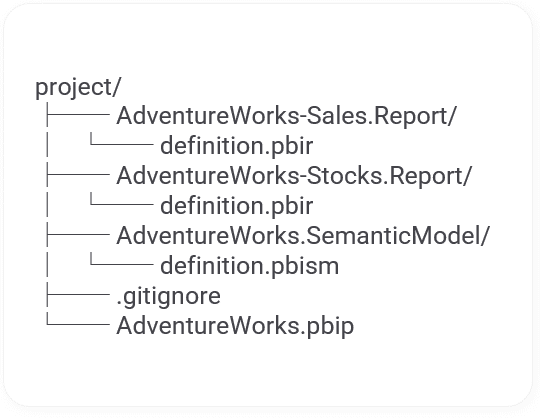
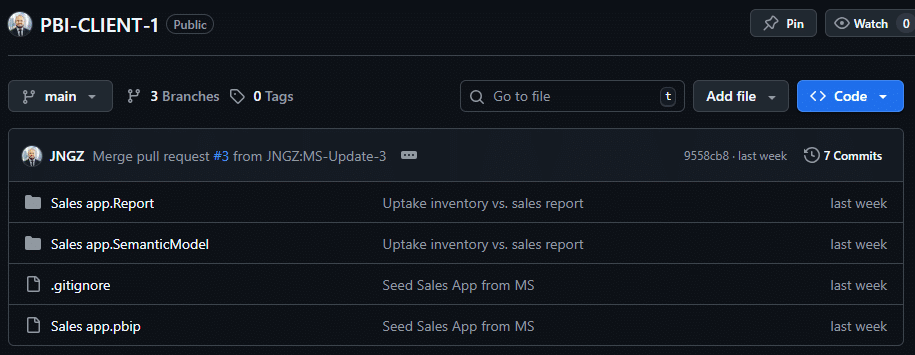
PBIP Anatomy: Power BI Projects now include separate folders for semantic models and reports, along with a gitignore file for clean repository management.
TMDL Format: Tabular Model Definition Language allows storing semantic models in a human-readable format, making customisation and upgrades easier.
Version Control with Git: Developers can now leverage pull requests and branching strategies for Power BI Projects, ensuring traceability and development best practices.
Practical benefits
Client Customisation: Store customer models in Git, modify them, and adopt Microsoft’s latest changes without losing customisations.
Collaboration: Teams can work concurrently on reports and models using standard DevOps practices.
Demonstration example
In this section, we’ll jump into a hands-on example. This isn’t the definitive guide to branching strategies but one that illustrates how to incorporate Microsoft updates with a client’s customised semantic model. You can access the fully worked example from this GitHub repo: JNGZ/PBI-CLIENT-1
Here’s an overview of the steps we’ll follow:
- Install the desired template app from AppSource into the Power Bl Service
- Download the PBIX file from the workspace
- Save the file as a PBIP file
- Commit the PBIP project to Git
- Create a branch for your client’s customisations
- *Microsoft publishes an update
- Create a branch to uptake Microsoft’s latest changes
- Merge the uptake branch into Main
- Pull Main back into your client’s customised branch
1. Install the desired template app from AppSource into the Power BI Service
Microsoft deploys their open-source Power BI apps on AppSource as template apps. As of this writing, the latest version is version 27.0. You can easily install them by following this guide.
Alternatively, you can access the PBIP and PBIX files directly from the BCApps Github repo here.
2. Download the PBIX file from the workspace
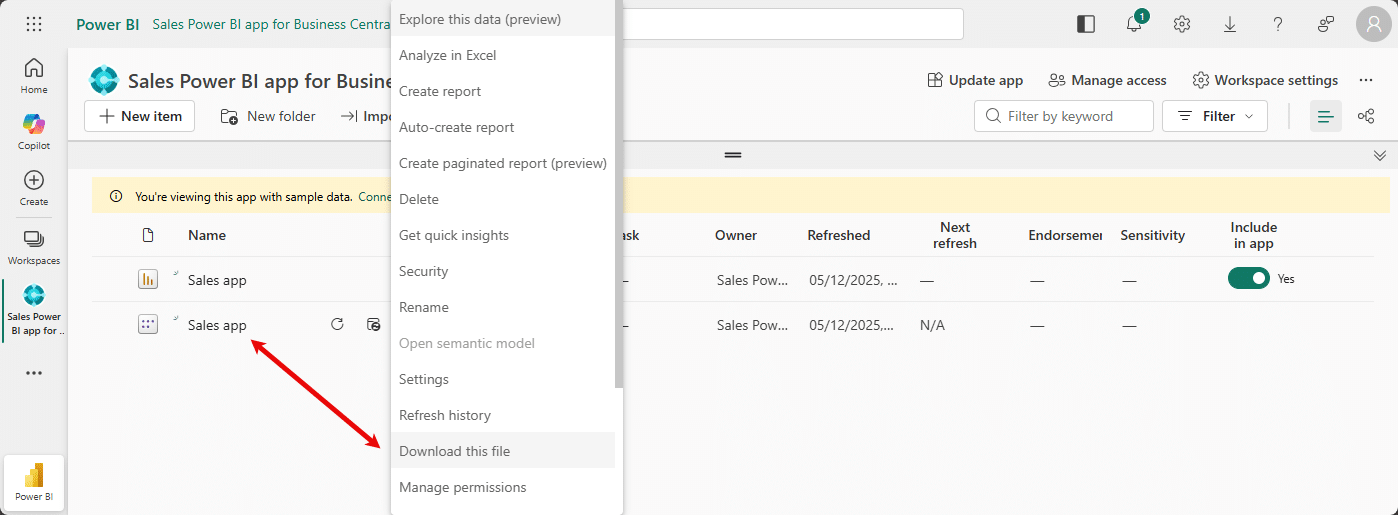
As of version 27.0, Microsoft has enabled Download this file for all semantic models.
3. Save the file as a PBIP file
Before converting a PBIX to a PBIP file you’ll need to enable the Power BI Projects preview feature.
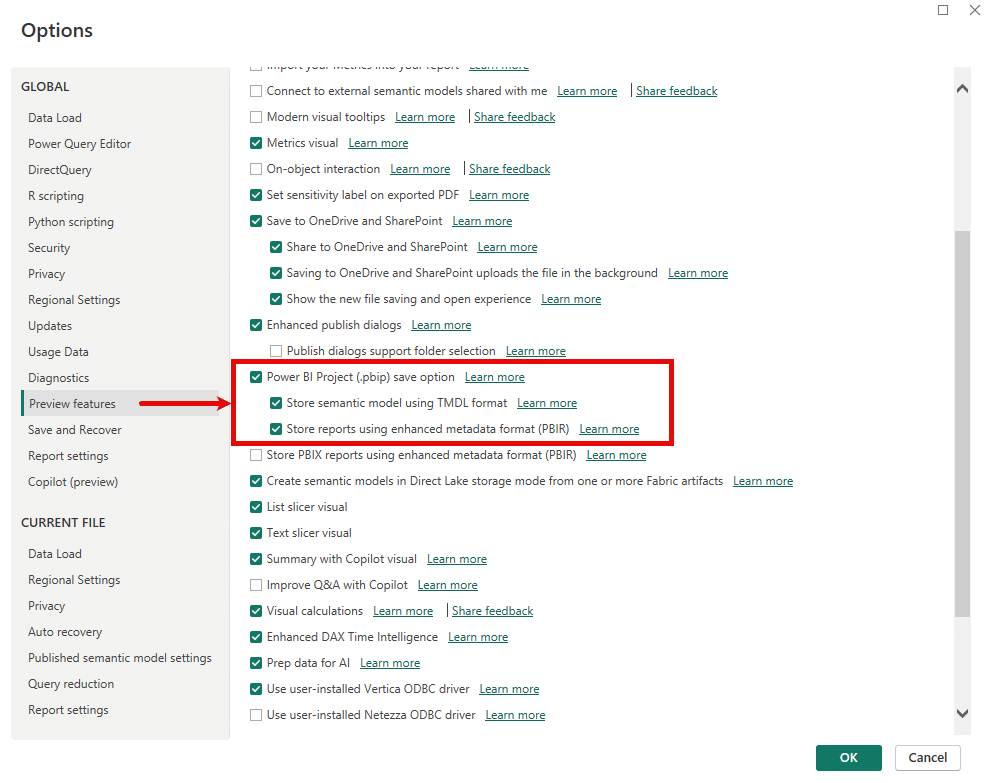
Go to File > Options and settings > Options > Preview features and check the box next to Power BI Project (.pbip) save option.
We would also recommend enabling:
- Store semantic model using TMDL format
- Store reports using enhanced metadata format (PBIR)
Once enabled, use Save as to save the semantic model as a .pbip file.
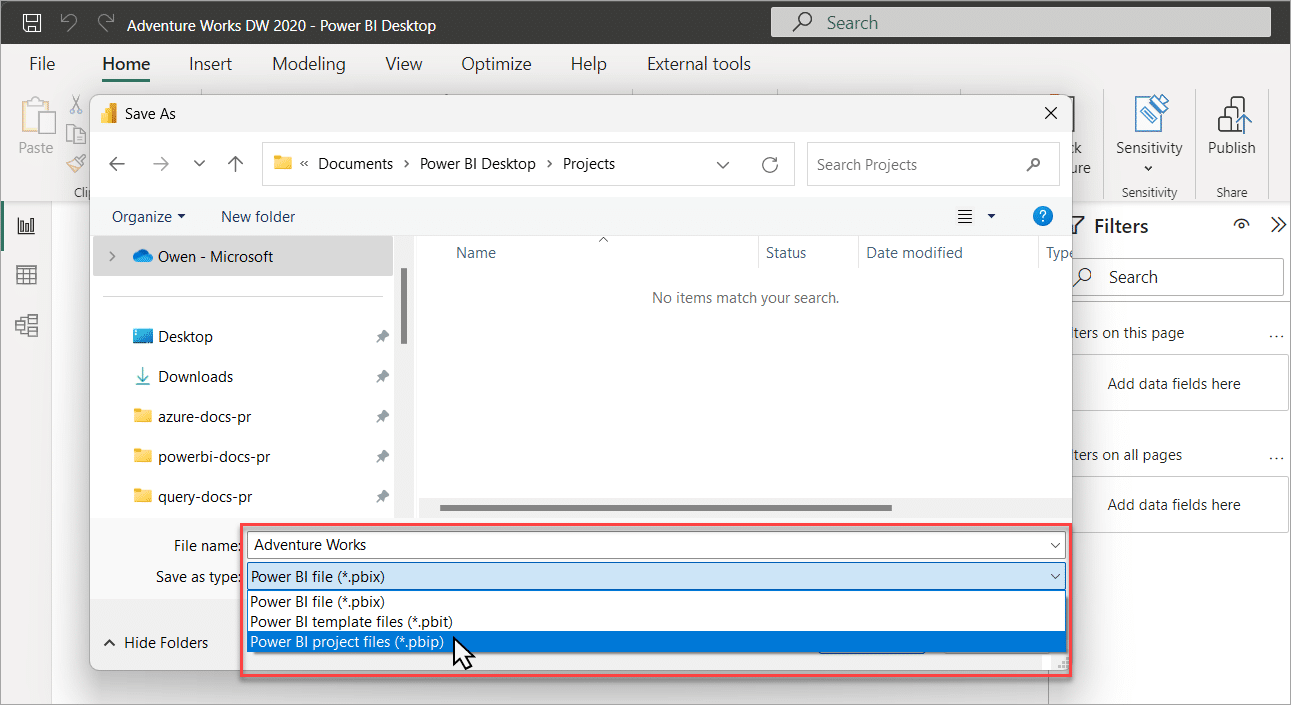
4. Commit the PBIP project to Git
This article assumes readers are already familiar with managing Git repositories, so foundational steps such as creating client repositories, branches, and commits are not covered.
The result of this step is that you have new Main branch with Microsoft’s semantic model committed as a Power BI Project. The Git folder structure should look like this:
5. Create a branch for your client’s customisations
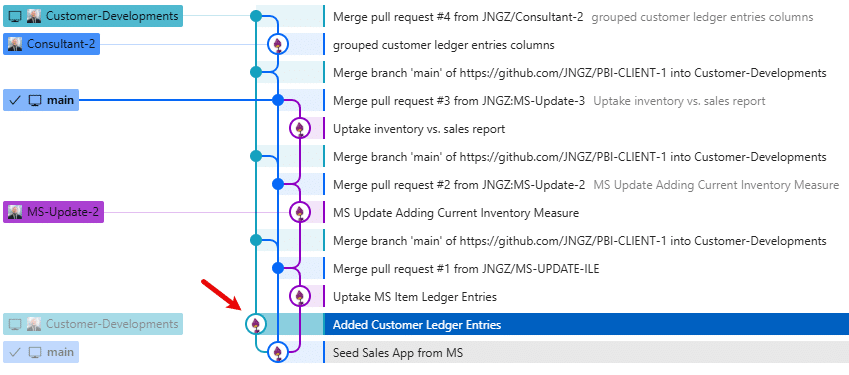
To manage customisations for your client and leave the door open for future Microsoft updates, we’ll branch off main and create the Customer-Developments branch.
The idea is that Main branch tracks Microsoft updates and provides an easy way to pull updates into your customer’s branch.
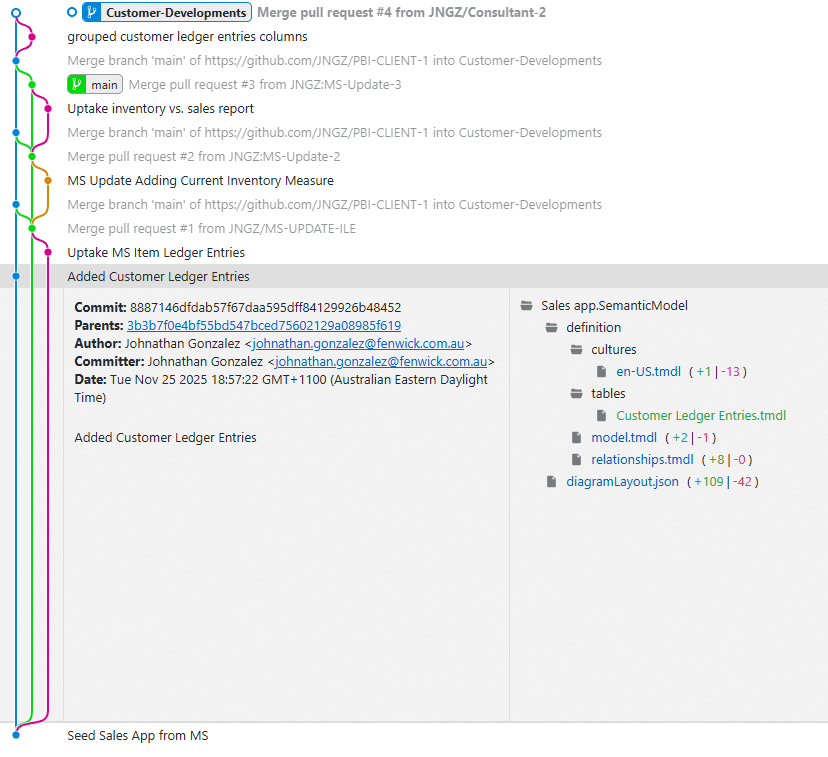
In the example below, we’ve branched out and added customer ledger entries to the model.
6. *Microsoft publishes an update
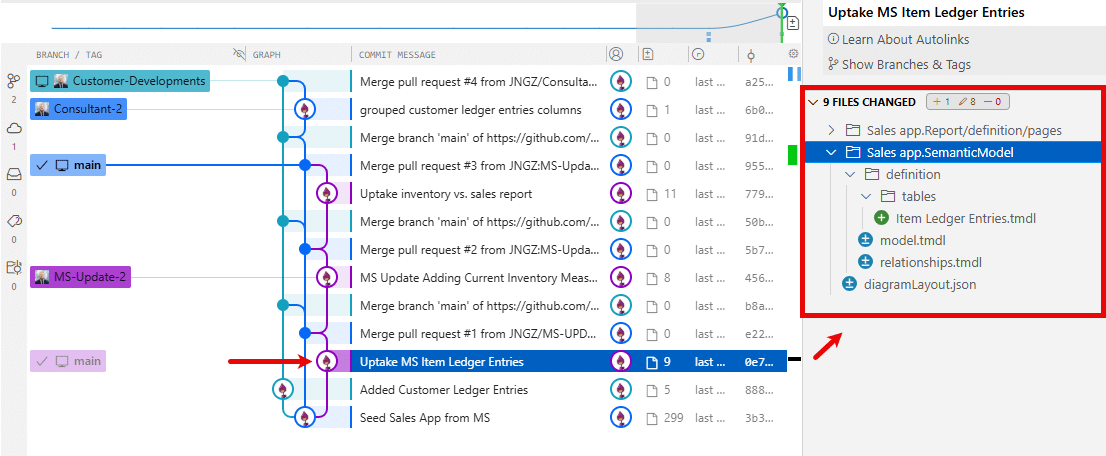
Now, let’s say Microsoft pushes an update to the Sales App where they’ve added Item Ledger Entries to the model.
7. Create a branch to uptake Microsoft’s latest changes
To integrate these changes with the customer’s model, begin by downloading the latest PBIX, converting it to a PBIP and committing it to a new branch called Uptake MS Item Ledger Entries. This is branching off the Main branch.
By overriding the contents in this branch with the latest PBIP contents, we’ll easily pick up the model and report changes made by Microsoft.
8. Merge the uptake branch into Main
Next, we’ll create a pull request from Uptake MS Item Ledger Entries into Main. This will ensure we’re tracking Microsoft’s latest changes.

9. Pull main back into your client’s customised branch
Finally, to integrate Microsoft’s latest change into our Customer-Developments branch we’ll Git: Pull from Main.
This will stage the file differences and highlight any merge conflicts that need to be resolved. Once resolved, commit the changes back into the Customer-Developments branch and deploy the .PBIX for your customer.
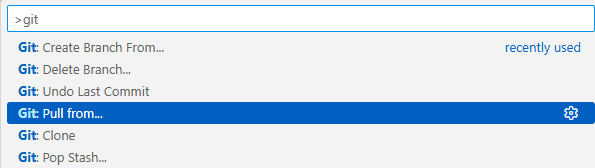
The reality is that we’ll always have to contend with merge conflicts as part of this process. It’s just that we have a means of managing it with Git.
Looking ahead
Looking ahead, the introduction of PBIP marks a clear shift toward more maintainable and predictable analytics development. As Microsoft continues refining the PBIP format, teams will be able to manage Power BI solutions with the same discipline used in application development.
We’ll continue developing and sharing these approaches throughout next year’s events and look forward to having broader discussions at upcoming 2026 industry events.
FAQs
- Power BI Projects is a folder-based project format for Power BI reports and models.
- Unlike PBIX, which is a monolithic binary file, PBIP stores models, reports, and metadata in individual files, making them text-based, human-readable, and compatible with Git version control.
- Power BI Projects (PBIP) separates report components into individual files, allowing teams to commit changes, create branches, and merge updates using Git.
- This lets multiple developers collaborate on models and reports safely without overwriting each other’s changes.
- Yes. PBIP stores semantic models in TMDL (Tabular Model Definition Language), which is text-based.
- This allows developers to see line-by-line changes in DAX measures, calculated columns, and table definitions using Git diff tools.
- You can maintain a “vanilla” template branch for the standard report, then create separate branches for client-specific customizations.
- When the base template is updated (e.g., by Microsoft), you can merge changes into client branches without losing custom work.
- Yes. PBIP is designed to be fully compatible with Power BI Desktop.
- You can open PBIP projects in the desktop client, edit reports and models, and then commit changes back to your Git repository.
- Track detailed changes to reports and models
- Collaborate safely across teams
- Maintain multiple versions/branches for clients or environments
- Integrate Power BI projects into CI/CD workflows
- Reduce risk of losing customizations during updates
- Yes. Since PBIP stores projects as text-based files, it supports standard software development practices like pull requests, code reviews, branching, and merging.
- This enables open-source-style collaboration on Power BI projects.
PBIP is expected to be fully available in 2026, allowing organizations to adopt version-control-based workflows more broadly.
By separating models, reports, and metadata into text files, PBIP makes it easier to:
- Audit and review changes
- Apply updates without overwriting customizations
- Collaborate across multiple developers
- Integrate with software development pipelines
- No additional tools are required beyond standard Git clients.
- PBIP projects are fully compatible with any Git repository, allowing standard commit, push, pull, and merge operations.