

Welcome to the fifth edition of my series on Business Central Document Dates series where I will be focusing on all things dates relating to the Production Order document. This is a follow up to my edition on Assembly Order dates which can be found here.
Clients often ask me what the various document date fields across transactional documents mean and how they interact with other dates. Or I come across some very creative uses of existing date fields. Whilst it might be tempting to adopt the use of one of the “other” date fields you may not currently be utilising, I can assure you they all serve a unique purpose.
This concludes my series of articles around the Dynamics 365 Business Central Document Dates, which started with Purchase Orders. I hope I have helped dispel some of the ambiguity of the date fields across all documents.
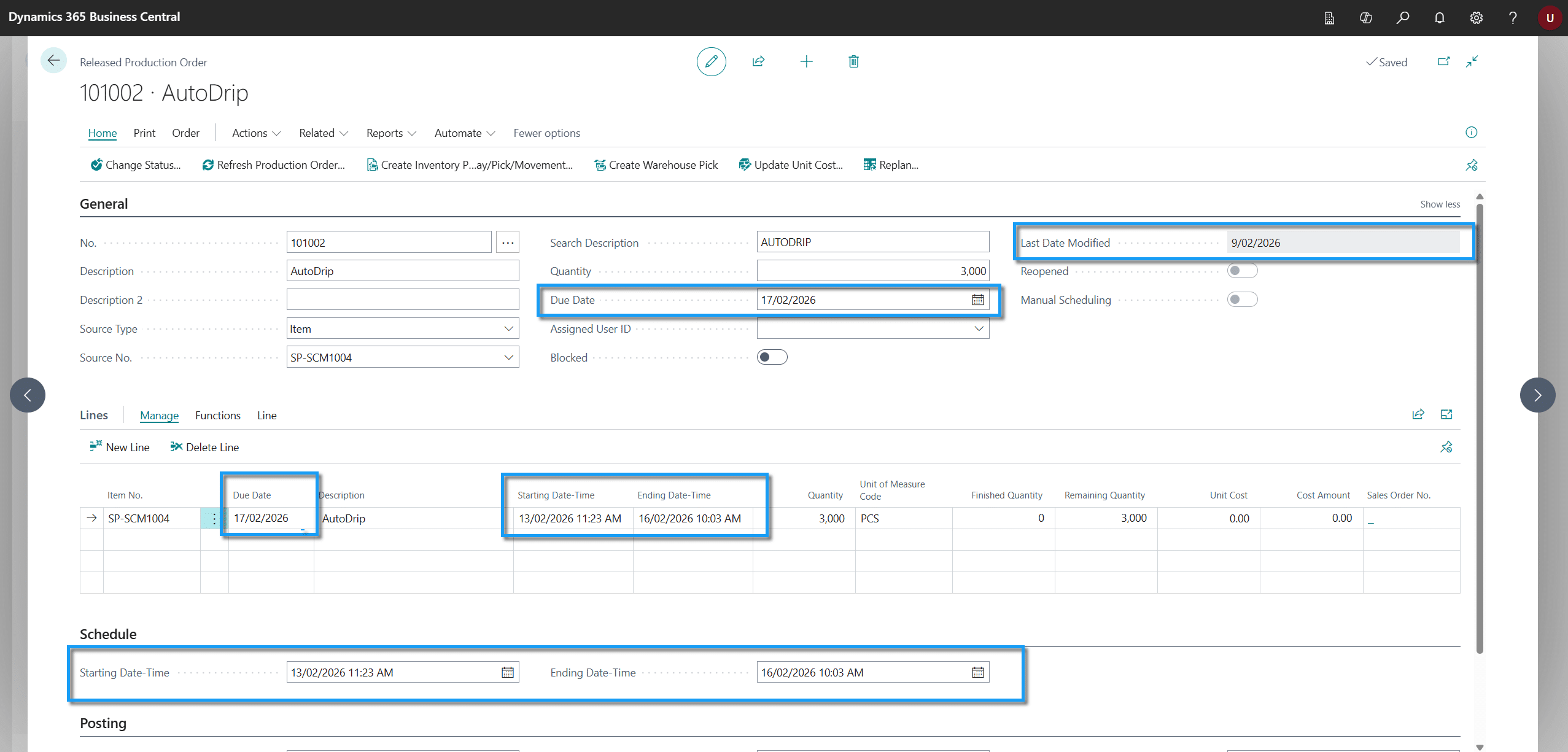
Production Order Dates
Last Modified Date
Specifies the date the order was last changed by a user.
Starting Date-Time
Specifies the date production should start in order to output a produced item by the “Due Date”.
Ending Date-Time - Expected Capacity Need = Starting Date-Time
Expected capacity need is the sum of capacity requirements of all routing lines associated with the production order.
The starting date-time will also be affected by the current load and capacity setup of the work centres the production orders is routed through.
In a multi-level production order, production order line “Starting Date-Time” represents the start of the work in progress item demand range. The demand event of components used within this level of the bill of materials is represented by the starting date-time of the linked routing step.
Ending Date-Time
Specifies the date production should finish. The Finished Good item is expected to be output to inventory at this point (not necessarily available for the demand event depending on “Safety Lead Time” and “Warehouse Handling Time”).
Due Date - Inbound Whs. Handling Time - Safety Lead Time = Ending Date-Time
In a multi-level production order the work in progress ending date-time is represented on the production order line.
The production order line “Ending Date-Time” represents the work in progress supply event.
Due Date
Specifies the date that the output item is expected to be available on inventory to supply a demand event.
This date is updated when you change the starting date field (except when the production order is linked to a sales order).
If the production is linked to a sales order the Due Date will be the same as the Shipment Date on the Sales Order.
Ending Date-Time + Safety Lead Time + Inbound Whse. Handling Time = Due Date
FAQs
- The Starting Date-Time is when production should begin.
- In a backward scheduling scenario Business Central calculates the start-date by working backwards from the end-date.
- The calculation considers:
- Expected capacity requirements
- Work centre capacity
- Existing production load
- Starting production on this date helps ensure the item is completed by its required due date.
- The Ending Date-Time is when manufacturing is expected to finish.
- It represents when the finished item is produced and posted to inventory.
- The item may not yet be available for use if:
- Safety Lead Time applies.
- Inbound Warehouse Handling Time applies.
- It is the production completion date, not necessarily the inventory availability date.
- The Due Date is when the finished item is expected to be available to meet demand.
- It includes:
- Production completion
- Safety Lead Time
- Inbound Warehouse Handling Time
- If the production order is linked to a sales order:
- The Due Date matches the Sales Order Shipment Date.
- This is the date planning and order fulfilment work towards.
- Business Central works backwards from the Ending Date-Time.
- It subtracts the total expected production time.
- The calculation considers:
- Routing times
- Work centre capacity
- Shop calendars
- Existing production load
- This helps create a realistic production schedule.
- Business Central calculates it using:
- Due Date
- Safety Lead Time
- Inbound Warehouse Handling Time
- Formula:
- Due Date − Inbound Warehouse Handling Time − Safety Lead Time = Ending Date-Time
- This determines when production itself must finish.
- Business Central automatically recalculates related dates.
- The Due Date is updated to reflect the revised production schedule.
- Exception:
- If the production order is linked to a sales order, the Due Date remains tied to the Sales Order Shipment Date.
- The Ending Date-Time is when manufacturing finishes.
- The Due Date is when the item is expected to be available for use.
- The gap exists because Business Central can include:
- Safety Lead Time
- Inbound Warehouse Handling Time
- This allows time for post production handling and warehouse processes before the item is available.
- It records the last date the production order was changed.
- It updates whenever a user modifies the order.
- It is useful for:
- Auditing changes
- Troubleshooting production issues
- Identifying recent updates
- It does not affect production planning or scheduling.
- Each production order level has its own dates.
- The Starting Date-Time represents when work begins for that level.
- The Ending Date-Time represents when that level finishes.
- Business Central links these dates across parent and component production orders to ensure materials are available when needed.
- Use Starting Date-Time to plan when production should begin.
- Use Ending Date-Time to know when manufacturing should finish.
- Use Due Date to understand when inventory will be available to fulfil demand.
- Each date serves a different purpose and should not be used interchangeably.